Bimetrik Chrome Extension
Your profitability data, right where you work.
See net profit and profit margin directly on Trendyol, Hepsiburada, Amazon and Ticimax storefronts and seller panels—without leaving the product page.
The official Bimetrik Chrome extension · Secure sign-in with 2FA support
Net Profit
₺128,40
Profit Margin
%18,6
No need to switch screens to see profit
Make faster decisions without switching dashboards.
The Bimetrik Chrome Extension matches the product you are viewing with its profitability data in Bimetrik. Net profit and profit margin appear directly on the page where you work.
Profitability at a glance
See net profit and profit margin directly on the product screen.
Stop getting lost between tabs
Make decisions without jumping between the storefront, seller panel and Bimetrik.
Accurate product-level matching
The extension reads the barcode on the page and retrieves the matching product data from the Bimetrik API.
It connects the product you’re viewing with your Bimetrik data.
Brings the profitability card onto the page
Shows the product’s net profit and profit margin on the storefront or seller panel you are viewing.
Matches the product by barcode
Detects the barcode on the page and matches it with the correct record in your Bimetrik account.
Provides secure sign-in
Sign in with your Bimetrik account and protect it with two-factor authentication support.
Keeps you in control
Activates site access for each platform only after you approve it.
Real usage
The extension appears inside the screens you already use.
From storefront product pages to seller-panel product lists and order rows, profitability data shows up where you work.
01
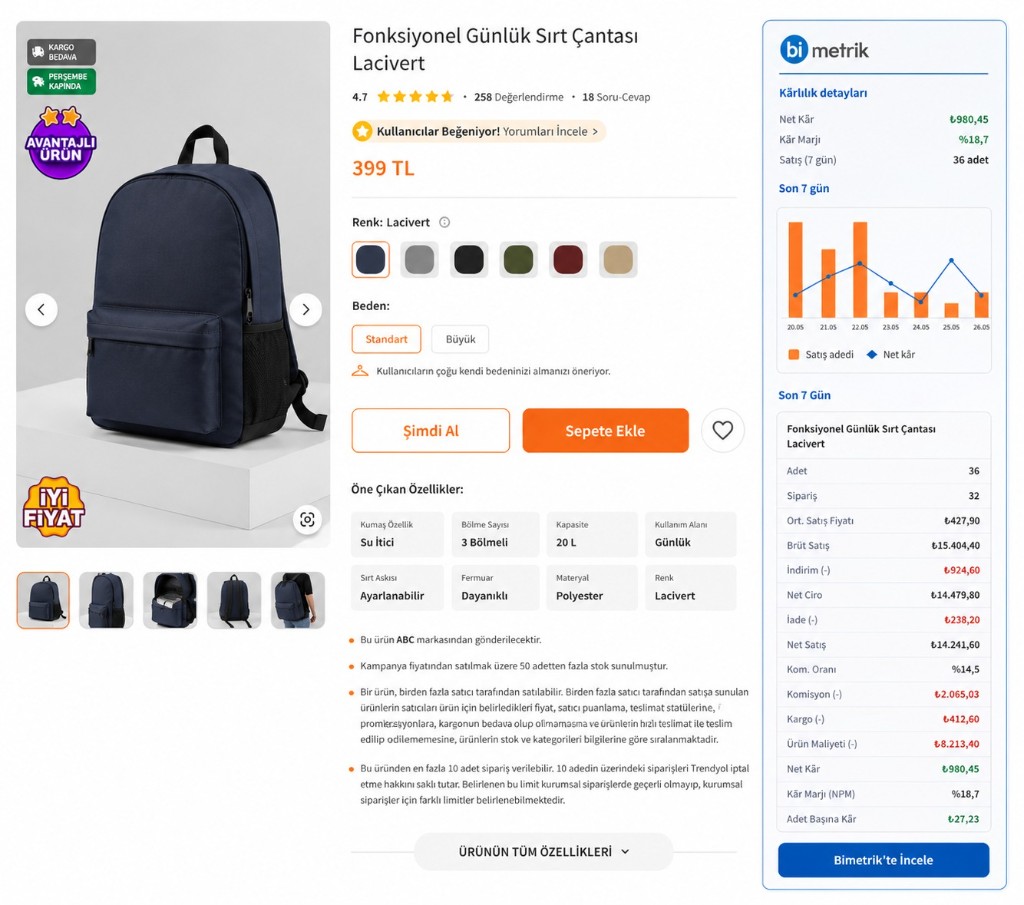
Storefront product page
See net profit, profit margin, sales and cost breakdown in a side panel on the product detail page.
02
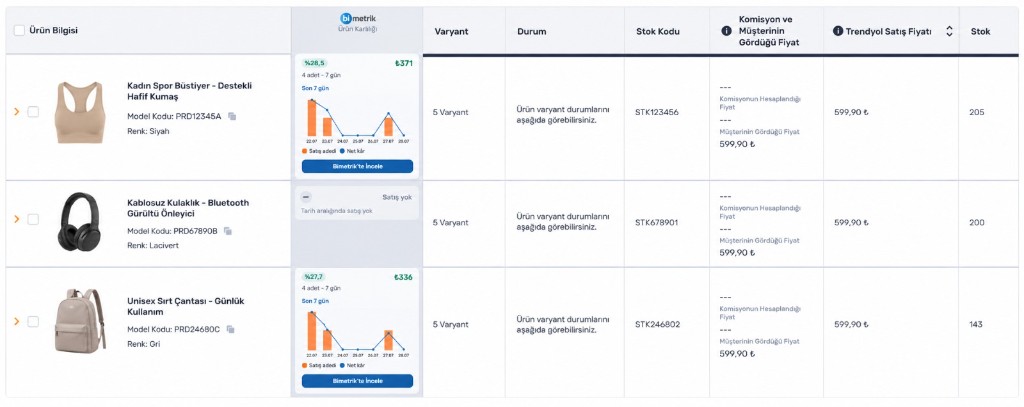
Seller panel product list
Profit margin, net profit and a 7-day performance summary appear directly in product rows.
03
Order row
Margin and net profit are embedded into the existing order row without leaving the flow.

Data shown in the screenshots has been anonymized.
Supported platforms
Four platforms. One profitability experience.
Access Bimetrik profitability data directly on Trendyol, Hepsiburada, Amazon and Ticimax storefronts and seller panels.
Trendyol
Storefront and seller panel support
Hepsiburada
Storefront and seller panel support
Amazon
Storefront and seller panel support
Ticimax
Storefront and seller panel support
Profitability on your screen in four steps.
- 01
Install the extension
Add Bimetrik to your browser for free from the Chrome Web Store.
- 02
Sign in to your Bimetrik account
Sign in securely with your active account.
- 03
Approve platform access
Enable site access for the storefront or seller panel you want to use.
- 04
Open a product page
When the barcode matches, the profitability card appears automatically.
An active Bimetrik account and internet connection are required.
Built for teams that manage profitability in the flow of work.
E-commerce managers
See product performance and margin at the moment you make a decision.
Operations teams
Speed up daily checks without switching between tabs.
Category and pricing teams
Evaluate product prices alongside net profit and margin data.
Privacy and security
Your panel passwords and session cookies remain yours.
The Bimetrik Chrome Extension works with the minimum data it needs and keeps access under your control.
Read the Privacy Policy- Your panel passwords and session cookies are never read or stored.
- Only the product identifier and your Bimetrik account session information are processed.
- Data is transmitted to the Bimetrik API over an encrypted connection.
- Site access is activated only for platforms you approve.
The official Bimetrik Chrome extension
Don’t switch dashboards just to see your profit.
Install the Bimetrik Chrome Extension for free and see net profit and profit margin directly on the product screen.
An active Bimetrik account is required.